Friday, May 13, 2016

Dynamic SQL

A dynamic SQL in a stored procedure is a single Transact-SQL statement or a set of statements stored in a variable and executed using a SQL command. There may be several methods of implementing this in SQL Server. 

"When to Use Dynamic SQL?" We can't definitely say that a Static SQL will meet all our programming needs. A Dynamic SQL is needed when we need to retrieve a set of records based on different search parameters. Say for example - An employee search screen or a general purpose report which needs to execute a different SELECT statement based on a different WHERE clause.

NOTE: Most importantly, the Dynamic SQL Queries in a variable are not compiled, parsed, checked for errors until they are executed.

sp_executesql Vs EXECUTE Command
A dynamically build Transact-SQL statements can be executed using EXECUTE Command or sp_executesql statement.

sp_executesql which is more efficient, faster in execution and also supports parameter substitution. If we are using EXECUTE command to execute the SQL String, then all the parameters should be converted to character and made as a part of the Query before execution. But the sp_executesql statement provides a better way of implementing this. It allows us to substitute the parameter values for any parameter specified in the SQL String. Before getting into the actual example, let me differentiate these two commands with a simple example. Say - selecting a record from the employee table using the ID in the WHERE clause.

The basic syntax for using EXECUTE command:

EXECUTE(@SQLStatement)

e.g. 
/* Using EXECUTE Command */
/* Build and Execute a Transact-SQL String with a single parameter 
 value Using EXECUTE Command */

/* Variable Declaration */
DECLARE @EmpID AS SMALLINT
DECLARE @SQLQuery AS NVARCHAR(500)
/* set the parameter value */
SET @EmpID = 1001
/* Build Transact-SQL String with parameter value */
SET @SQLQuery = 'SELECT * FROM tblEmployees WHERE EmployeeID = ' + 
CAST(@EmpID AS NVARCHAR(10))
/* Execute Transact-SQL String */

EXECUTE(@SQLQuery)


The basic syntax for using sp_executesql:

sp_executesql [@SQLStatement],[@ParameterDefinitionList],[@ParameterValueList]

e.g.

/* Variable Declaration */
DECLARE @EmpName AS NVARCHAR(50)
DECLARE @SQLQuery AS NVARCHAR(500)

/* Build and Execute a Transact-SQL String with a single parameter 
value Using sp_executesql Command */
SET @EmpName = 'John' 
SET @SQLQuery = 'SELECT * FROM tblEmployees 
WHERE EmployeeName LIKE '''+ '%' + @EmpName + '%' + '''' 
EXECUTE sp_executesql @SQLQuery

/* Variable Declaration */
DECLARE @EmpID AS NVARCHAR(50)
DECLARE @SQLQuery AS NVARCHAR(500)

/* Build and Execute a Transact-SQL String with a single 
parameter value Using sp_executesql Command */
SET @EmpID = '1001,1003' 
SET @SQLQuery = 'SELECT * FROM tblEmployees 
WHERE EmployeeID IN(' + @EmpID + ')'
EXECUTE sp_executesql @SQLQuery

/* Variable Declaration */
DECLARE @OrderBy AS NVARCHAR(50)
DECLARE @SQLQuery AS NVARCHAR(500)

/* Build and Execute a Transact-SQL String with a single parameter 
value Using sp_executesql Command */
SET @OrderBy = 'Department' 
SET @SQLQuery = 'SELECT * FROM tblEmployees Order By ' + @OrderBy

EXECUTE sp_executesql @SQLQuery

Lock Escalations

Lock Escalations are an optimization technique used by SQL Server to control the amount of locks that are held within the Lock Manager of SQL Server. Let’s start in the first step with the description of the so-called Lock Hierarchy in SQL Server, because that’s the reason why the concept of the Lock Escalations exists in a relational database like SQL Server.

Lock Hierarchy

Database-->Table-->Page-->Row

The lock hierarchy starts at the database level, and goes down to the row level. You always have a Shared Lock (S) on the database level itself. When your query is connected to a database, the Shared Lock prevents the dropping of the database, or that backups are restored over that database. And underneath the database level, you have locks on the table, on the pages, and the records when you are performing an operation.

When you are executing a SELECT statement, you have an Intent Shared Lock (IS) on the table and page level, and a Shared Lock (S) on the record itself. When you are performing a data modification statement (INSERT, UPDATE, DELETE), you have an Intent Exclusive or Update Lock (IX or IU) on the table and page level, and a Exclusive or Update Lock (X or U) on the changed records. SQL Server always acquires locks from top to bottom to prevent so-called Race Conditions, when multiple threads trying to acquire locks concurrently within the locking hierarchy. 

Lock Escalations

As soon as you have more than 5.000 locks on one level in your locking hierarchy, SQL Server escalates these many fine-granularity locks into a simple coarse-granularity lock. By default SQL Server *always* escalates to the table level.

As you can see, you have only one big lock on the table itself. In the case of the DELETE operation, you have one Exclusive Lock (X) on the table level. This will hurt the concurrency of your database in a very negative way! Holding an Exclusive Lock on the table level means that no other session is able anymore to access that table – every other query will just block. When you are running your SELECT statement in the Repeatable Read Isolation Level, you are also holding your Shared Locks till the end of the transaction, means you will have a Lock Escalation as soon as you have read more than 5.000 rows. The result is here one Shared Lock on the table itself! Your table is temporary readonly, because every other data modification on that table will be blocked!

There is also a misconception that SQL Server will escalate from the row level to the page level, and finally to the table level. Wrong! Such a code path doesn’t exist in SQL Server! SQL Server will by default *always* escalate directly to the table level. An escalation policy to the page level just doesn’t exist. If you have your table partitioned (Enterprise Edition only!), then you can configure an escalation to the partition level. But you have to test here very carefully your data access pattern, because a Lock Escalation to the partition level can cause a deadlock. Therefore this option is also not enabled by default.

Since SQL Server 2008 you can also control how SQL Server performs the Lock Escalation – through the ALTER TABLE statement and the property LOCK_ESCALATION. There are 3 different options available:

Alter Table dbo.Tablename Set (Lock_Escalation = AUTO --Table  or Disable)


TABLE
AUTO
DISABLE

The default option is TABLE, means that SQL Server *always* performs the Lock Escalation to the table level – even when the table is partitioned. If you have your table partitioned, and you want to have a Partition Level Lock Escalation (because you have tested your data access pattern, and you don’t cause deadlocks with it), then you can change the option to AUTO. AUTO means that the Lock Escalation is performed to the partition level, if the table is partitioned, and otherwise to the table level. And with the option DISABLE you can completely disable the Lock Escalation for that specific table. But disabling Lock Escalations is not the very best option, because the Lock Manager of SQL Server can then consume a huge amount of memory, if you are not very carefully with your queries and your indexing strategy.

Conclusion


Lock Escalation in SQL Server is mainly a nightmare. How will you delete more than 5.000 rows from a table without running into Lock Escalations? You can disable Lock Escalation temporarily, but you have to be very careful here. Another option (that I’m suggesting) is to make your DELETE/UPDATE statements in a loop as different, separate transactions: DELETE/UPDATE less than 5.000 rows, so that you can prevent Lock Escalations. As a very nice side-effect your huge, big transaction will be splitted into multiple smaller ones, which will also help you with Auto Growth issues that you maybe have with your transaction log.

SQL Server Important Topics

What is a Stored Procedure?


A stored procedure is a named group of SQL statements that have been previously created and stored in the server database. Stored procedures accept input parameters so that a single procedure can be used over the network by several clients using different input data. And when the procedure is modified, all clients automatically get the new version. Stored procedures reduce network traffic and improve performance. Stored procedures can be used to help ensure the integrity of the database.

e.g. sp_helpdb, sp_renamedb, sp_depends etc.


What is a Trigger?


A trigger is a SQL procedure that initiates an action when an event (INSERT, DELETE or UPDATE) occurs. Triggers are stored in and managed by the DBMS. Triggers are used to maintain the referential integrity of data by changing the data in a systematic fashion. A trigger cannot be called or executed; DBMS automatically fires the trigger as a result of a data modification to the associated table. Triggers can be considered to be similar to stored procedures in that both consist of procedural logic that is stored at the database level. Stored procedures, however, are not event-drive and are not attached to a specific table as triggers are. Stored procedures are explicitly executed by invoking a CALL to the procedure while triggers are implicitly executed. In addition, triggers can also execute stored procedures.

Nested Trigger: A trigger can also contain INSERT, UPDATE and DELETE logic within itself; so when the trigger is fired because of data modification, it can also cause another data modification, thereby firing another trigger. A trigger that contains data modification logic within itself is called a nested trigger.

What are the Different Types of Triggers?

There are two types of Triggers.

1)      DML Trigger

There are two types of DML Triggers

1.Instead of Trigger
Instead of Triggers are fired in place of the triggering action such as an insert, update, or delete.

2. After Trigger
After triggers execute following the triggering action, such as an insert, update, or delete.

3) DDL Trigger

This type of trigger is fired against Drop Table, Create Table, Alter Table or Login events. DDL Triggers are always After Triggers.


What is a View?


A simple view can be thought of as a subset of a table. It can be used for retrieving data as well as updating or deleting rows. Rows updated or deleted in the view are updated or deleted in the table the view was created with. It should also be noted that as data in the original table changes, so does the data in the view as views are the way to look at parts of the original table. The results of using a view are not permanently stored in the database. The data accessed through a view is actually constructed using standard T-SQL select command and can come from one to many different base tables or even other views.


What is an Index?


An index is a physical structure containing pointers to the data. Indices are created in an existing table to locate rows more quickly and efficiently. It is possible to create an index on one or more columns of a table, and each index is given a name. The users cannot see the indexes; they are just used to speed up queries. Effective indexes are one of the best ways to improve performance in a database application. A table scan happens when there is no index available to help a query. In a table scan, the SQL Server examines every row in the table to satisfy the query results. Table scans are sometimes unavoidable, but on large tables, scans have a terrific impact on performance.


What is a Linked Server?


Linked Servers is a concept in SQL Server by which we can add other SQL Server to a Group and query both the SQL Server databases using T-SQL Statements. With a linked server, you can create very clean, easy–to-follow SQL statements that allow remote data to be retrieved, joined and combined with local data. Stored Procedures sp_addlinkedserver, sp_addlinkedsrvlogin will be used to add new Linked Server.


What is a Cursor?

A cursor is a database object used by applications to manipulate data in a set on a row-by-row basis, instead of the typical SQL commands that operate on all the rows in the set at one time.

In order to work with a cursor, we need to perform some steps in the following order:

Declare cursor
Open cursor
Fetch row from the cursor
Process fetched row
Close cursor
Deallocate cursor


What is the Difference between a Function and a Stored Procedure?


UDF can be used in the SQL statements anywhere in the WHERE/HAVING/SELECT section, whereas Stored procedures cannot be. UDFs that return tables can be treated as another rowset. This can be used in JOINs with other tables. Inline UDF’s can be thought of as views that take parameters and can be used in JOINs and other Rowset operations.


What is subquery? Explain the Properties of a Subquery?


Subqueries are often referred to as sub-selects as they allow a SELECT statement to be executed arbitrarily within the body of another SQL statement. A subquery is executed by enclosing it in a set of parentheses. Subqueries are generally used to return a single row as an atomic value although they may be used to compare values against multiple rows with the IN keyword.

A subquery is a SELECT statement that is nested within another T-SQL statement. A subquery SELECT statement if executed independently of the T-SQL statement, in which it is nested, will return a resultset. This implies that a subquery SELECT statement can stand alone, and it does not depend on the statement in which it is nested. A subquery SELECT statement can return any number of values and can be found in the column list of a SELECT statement, and FROM, GROUP BY, HAVING, and/or ORDER BY clauses of a T-SQL statement. A subquery can also be used as a parameter to a function call. Basically, a subquery can be used anywhere an expression can be used. 


What are the Difference between Clustered and a Non-clustered Index?


A clustered index is a special type of index that reorders the way records in the table are physically stored. Therefore, the table can have only one clustered index. The leaf nodes of a clustered index contain the data pages.

A non-clustered index is a special type of index in which the logical order of the index does not match the physical stored order of the rows on disk. The leaf node of a non-clustered index does not consist of the data pages. Instead, the leaf nodes contain index rows. 

What are the Different Index Configurations a Table can have?

A table can have one of the following index configurations:

No indexes
A clustered index
A clustered index and many non-clustered indexes
A non-clustered index
Many non-clustered indexes


What are Different Types of Collation Sensitivity?


Case sensitivity – A and a, B and b, etc.

Accent sensitivity – a and á, o and ó, etc.

Kana Sensitivity – When Japanese Kana characters Hiragana and Katakana are treated differently, it is called Kana sensitive.

Width sensitivity – When a single-byte character (half-width) and the same character represented as a double-byte character (full-width) are treated differently, it is width sensitive.


What is Difference between DELETE  and TRUNCATE Commands?


Delete command removes the rows from a table on the basis of the condition that we provide with a WHERE clause. Truncate will actually remove all the rows from a table, and there will be no data in the table after we run the truncate command.

TRUNCATE

TRUNCATE is faster and uses fewer system and transaction log resources than DELETE. (Read all the points below)
TRUNCATE removes the data by deallocating the data pages used to store the table’s data, and only the page deallocations are recorded in the transaction log.
TRUNCATE removes all the rows from a table, but the table structure, its columns, constraints, indexes and so on remains. The counter used by an identity for new rows is reset to the seed for the column.
You cannot use TRUNCATE TABLE on a table referenced by a FOREIGN KEY constraint.
Using T-SQL – TRUNCATE cannot be rolled back unless it is used in TRANSACTION. OR TRUNCATE can be rolled back when used with BEGIN … END TRANSACTION using T-SQL.
TRUNCATE is a DDL Command.
TRUNCATE resets the identity of the table.

DELETE

DELETE removes rows one at a time and records an entry in the transaction log for each deleted row.
DELETE does not reset Identity property of the table.
DELETE can be used with or without a WHERE clause
DELETE activates Triggers if defined on table.
DELETE can be rolled back.
DELETE is DML Command.
DELETE does not reset the identity of the table.


What are Different Types of Locks?


Shared Locks: 
Used for operations that do not change or update data (read-only operations), such as a SELECT statement.
Update Locks: 
Used on resources that can be updated. It prevents a common form of deadlock that occurs when multiple sessions are reading, locking, and potentially updating resources later.
Exclusive Locks: 
Used for data-modification operations, such as INSERT, UPDATE, or DELETE. It ensures that multiple updates cannot be made to the same resource at the same time.
Intent Locks: 
Used to establish a lock hierarchy. The types of intent locks are as follows: intent shared (IS), intent exclusive (IX), and shared with intent exclusive (SIX).
Schema Locks
Used when an operation dependent on the schema of a table is executing. The types of schema locks are schema modification (Sch-M) and schema stability (Sch-S).
Bulk Update Locks: 
Used when bulk-copying data into a table and the TABLOCK hint is specified.

What are Pessimistic Lock and Optimistic Lock?


Optimistic Locking is a strategy where you read a record, take note of a version number and check that the version hasn’t changed before you write the record back. If the record is dirty (i.e. different version to yours), then you abort the transaction and the user can re-start it.

Pessimistic Locking is when you lock the record for your exclusive use until you have finished with it. It has much better integrity than optimistic locking but requires you to be careful with your application design to avoid Deadlocks.

What is the ‘FILLFACTOR’?


A “FILLFACTOR” is one of the important arguments that can be used while creating an index.

According to MSDN, FILLFACTOR specifies a percentage that indicates how much the Database Engine should fill each index page during index creation or rebuild. Fill-factor is always an integer valued from 1 to 100. The fill-factor option is designed for improving index performance and data storage. By setting the fill-factor value, you specify the percentage of space on each page to be filled with data, reserving free space on each page for future table growth.

Specifying a fill-factor value of 70 would imply that 30 percent of each page will be left empty, providing space for index expansion as data is added to the underlying table. The fill-factor setting applies only when the index is created or rebuilt.

What are Points to Remember while Using the FILLFACTOR Argument?

If fill-factor is set to 100 or 0, the Database Engine fills pages to their capacity while creating indexes.
The server-wide default FILLFACTOR is set to 0.
To modify the server-wide default value, use the sp_configure system stored procedure.
To view the fill-factor value of one or more indexes, use sys.indexes.
To modify or set the fill-factor value for individual indexes, use CREATE INDEX or ALTER INDEX statements.
Creating a clustered index with a FILLFACTOR < 100 may significantly increase the amount of space the data occupies because the Database Engine physically reallocates the data while building the clustered index.


What is a Covered index?


It is an index that can satisfy a query just by its index keys without having needed to touch the data pages.

It means that when a query is fired, SQL Server doesn’t need to go to the table to retrieve the rows, but can produce the results directly from the index as the index covers all the columns used in query

When I Delete any Data from a Table, does the SQL Server reduce the size of that table?

When data are deleted from any table, the SQL Server does not reduce the size of the table right away; however, it marks those pages as free pages, showing that they belong to the table. When new data are inserted, they are put into those pages first. Once those pages are filled up, SQL Server will allocate new pages. If you wait for sometime, the background process de-allocates the pages, finally reducing the page size.

Software Project Cost Estimation Methods


1. Pure Expert Judgement
2. Historical Data
3. WideBand Delphi
4. Source Line of Code
5. Funtion Point
6. Use Case
7. Story Point
8. MonteCarlo
9. COCOMO -I, II


Inmon vs. Kimball

When it comes to designing a data warehouse for your business, the two most commonly discussed methods are the approaches introduced by Bill Inmon and Ralph Kimball. Debates on which one is better and more effective have been on for years. But a clear cut answer has never been arrived upon, as both philosophies have their own advantages and differentiating factors, and enterprises continue to use either of these. 

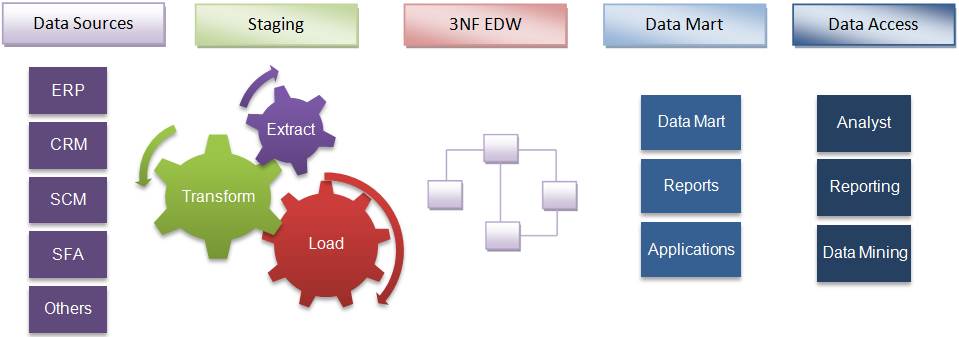
Bill Inmon’s enterprise data warehouse approach (the top-down design): A normalized data model is designed first. Then the dimensional data marts, which contain data required for specific business processes or specific departments are created from the data warehouse.
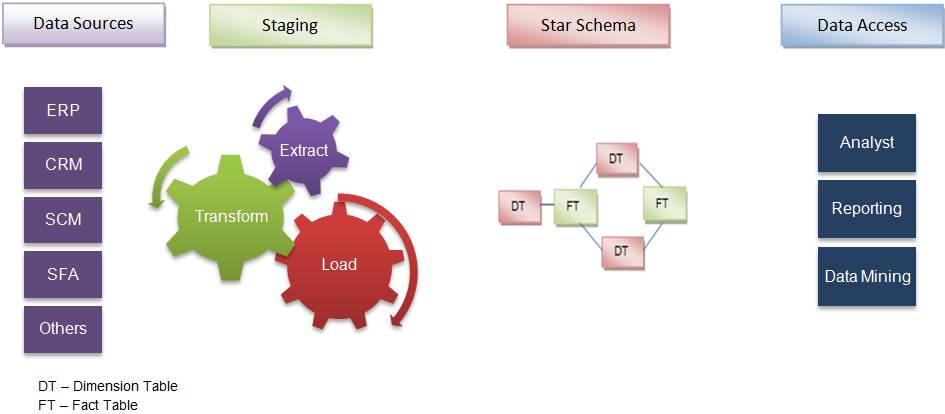
Ralph Kimball’s dimensional design approach (the bottom-up design): The data marts facilitating reports and analysis are created first; these are then combined together to create a broad data warehouse.

Inmon defines the data warehouse in the following terms:

Inmon’s top-down approach

Subject-oriented: The data in the data warehouse is organized so that all the data elements relating to the same real-world event or object are linked together

Time-variant: The changes to the data in the database are tracked and recorded so that reports can be produced showing changes over time

Non-volatile: Data in the data warehouse is never over-written or deleted -- once committed, the data is static, read-only, and retained for future reporting

Integrated: The database contains data from most or all of an organization's operational applications, and that this data is made consistent

Kimball’s bottom-up approach


Inmon defines data warehouse as a centralized repository for the entire enterprise. Data warehouse stores the ‘atomic’ data at the lowest level of detail. Dimensional data marts are created only after the complete data warehouse has been created. Thus, data warehouse is at the center of the Corporate Information Factory (CIF), which provides a logical framework for delivering business intelligence.

Keeping in mind the most important business aspects or departments, data marts are created first. These provide a thin view into the organizational data, and as and when required these can be combined into a larger data warehouse. Kimball defines data warehouse as “A copy of transaction data specifically structured for query and analysis”.
Kimball’s data warehousing architecture is also known as Data Warehouse Bus (BUS). Dimensional modeling focuses on ease of end user accessibility and provides a high level of performance to the data warehouse.


What are the Different Normalization Forms?

1NF: Eliminate Repeating Groups

Make a separate table for each set of related attributes, and give each table a primary key. Each field contains at most one value from its attribute domain.

2NF: Eliminate Redundant Data

If an attribute depends on only part of a multi-valued key, then remove it to a separate table.

3NF: Eliminate Columns Not Dependent On Key

If attributes do not contribute to a description of the key, then remove them to a separate table. All attributes must be directly dependent on the primary key. 

BCNF: Boyce-Codd Normal Form

If there are non-trivial dependencies between candidate key attributes, then separate them out into distinct tables.

4NF: Isolate Independent Multiple Relationships

No table may contain two or more 1:n or n:m relationships that are not directly related.

5NF: Isolate Semantically Related Multiple Relationships

There may be practical constrains on information that justify separating logically related many-to-many relationships.

ONF: Optimal Normal Form

A model limited to only simple (elemental) facts, as expressed in Object Role Model notation.

DKNF: Domain-Key Normal Form

A model free from all modification anomalies is said to be in DKNF.

Tuesday, November 10, 2015

Attach a SQL Server Database without a Transaction Log File

Suppose we have only .mdf file and .ldf file is deleted or crashed then here is the solution for that:

For Example the database file name is AdventureWorksDW2012_Data.mdf


Here is the code:

USE [master]
GO
CREATE DATABASE [AdventureWorksDW2012] ON 
( FILENAME = N'C:\Program Files\Microsoft SQL Server\MSSQL11.MSSQLSERVER\MSSQL\DATA\AdventureWorksDW2012_Data.mdf' )
FOR ATTACH
GO

Wednesday, November 4, 2015

Dimension Hierarchies

A hierarchy is the set of members in a dimension and their positions relative to one another. Hierarchies are sometimes represented as pyramidal structures. The only exceptions are hierarchies in which all members are at the same level.  From the top of a pyramidal hierarchy to the bottom, the members are progressively more detailed. The lower the level of a pyramidal hierarchy, the more members it usually contains. Analysis Services supports dimensions with multiple hierarchies. These dimensions provide similar yet alternate views of cube data. For example, a Time dimension with two hierarchies  can have a regular calendar hierarchy and a fiscal calendar hierarchy. In Analysis Services, a dimension with multiple hierarchies is defined as two or more dimensions with names that share the same prefix followed by a period but have different suffixes (for example, dimensions with names of Time.Calendar and Time.Fiscal). 


Types of Hierarchies in Data Warehouse:
Hierarchies are logical entities that an end user can use to analyze fact data.  These entities can be made of one or multiple levels.

Hierarchies are classified as three ways:-
1. Balanced
2. Unbalanced
3. Ragged


Balanced hierarchy:


Each level in a hierarchy has the same number of members above it as any other member at the same level. In a balanced hierarchy, all branches of the hierarchy descend to the same level, and each member's logical parent is the level immediately above the member. e.g. Each member in the Product Name level has a parent member in the Brand Name level, which in turn has a parent member in the Product Subcategory level, and so on. Also, every branch in the hierarchy can be traced, from highest to lowest level, to a member in the Product Name level.


UnBalanced hierarchy:


Each level in a hierarchy may not the same number of members as the member which are at the same level, refer the hierarchy structure shown above. In an unbalanced hierarchy, branches of the hierarchy descend to different levels. For example, an Organization dimension contains a member for each employee in a company. The CEO is the top member in the hierarchy, and the division managers and executive secretary are immediately beneath the CEO. The division managers have subordinate members but the executive secretary does not.

Ragged hierarchy:

It is not like balanced Hierarchy, the logical parent member of at least one member is not in the level immediately above the member. It will skip the immediate parent.  

For Example: In a company, all the divisions will be reporting to the VP thru hierarchical structure, but Finance department will directly reporting to VP without any middle level.


Ragged hierarchies of indeterminate depth are difficult to model and query in a relational database. Although SQL extensions and OLAP access languages provide some support for recursive parent/child relationships, these approaches have limitations. With SQL extensions, alternative ragged hierarchies cannot be substituted at query time, shared ownership structures are not supported, and time varying ragged hierarchies are not supported.  All these objections can be overcome in relational databases by modeling a ragged hierarchy with a specially constructed bridge table. This bridge table contains a row for every possible path in the ragged hierarchy and enables all forms of hierarchy traversal to be accomplished with standard SQL rather than using special language extensions.

The use of a bridge table for ragged variable depth hierarchies can be avoided by implementing a pathstring attribute in the dimension. For each row in the dimension, the pathstring attribute contains a specially encoded text string containing the complete path description from the supreme node of a hierarchy down to the node described by the particular dimension row. Many of the standard hierarchy analysis requests can then be handled by standard SQL, without resorting to SQL language extensions. However, the pathstring approach does not enable rapid substitution of alternative hierarchies or shared ownership hierarchies. The pathstring approach may also be vulnerable to structure changes in the ragged hierarchy that could force the entire hierarchy to be relabeled.

A ragged dimension is a dimension with at least one member whose logical parent is not in the level immediately above the member. For example, a Geography dimension consists of the levels Country, Province, and City. The logical parent of the Vatican City member in the City level is the Vatican City member in the Country level, because Vatican City is not divided into provinces. Because of the missing information for the Province level, the Geography dimension becomes a ragged dimension.
In a ragged dimension's table, the logically missing members, such as the province containing the Vatican City member in the City level in the preceding example, can be represented in different ways. The table cells can contain nulls or empty strings, or they can contain the same value as their parent to serve as a placeholder. For example, in the column for the Province level, in rows that contain members in the City level for the Vatican City member in the Country level, the placeholder member is also named Vatican City to match the name of the Country member. The nonexistent Vatican City province of Vatican City is stored as a placeholder member in the Province level because its parent at the Country level is the Vatican City member.

Saturday, October 31, 2015

Data Warehouse Questions

Q: Define Data Warehouse? 
A: Data warehouse is Subject Oriented, Integrated, Time-Variant and Nonvolatile collection of data that support management's decision making process. 

Q: What does the subject oriented data warehouse signifies? 
A: Subject oriented signifies that the data warehouse stores the information around a particular subject such as product, customer, sales etc. 

Q: List any five applications of Data Warehouse? 
A: Some applications include Financial services, Banking Services, Customer goods, Retail Sectors, Controlled Manufacturing. 

Q: What does OLAP and OLTP stand for? 
A: OLAP is acronym of Online Analytical Processing and OLAP is acronym of Online Transactional Processing 

Q: What is the very basic difference between data warehouse and Operational Databases? 
A: Data warehouse contains the historical information that is made available for analysis of the business whereas the Operational database contains the current information that is required to run the business. 

Q: List the Schema that Data Warehouse System implements ? 
A: Data Warehouse can implement Star Schema, Snowflake Schema or the Fact Constellation Schema 

Q: What is Data Warehousing? 
A: Data Warehousing is the process of constructing and using the data warehouse. 

Q: List the process that are involved in Data Warehousing? 
A: Data Warehousing involves data cleaning, data integration and data consolidations. 

Q: List the functions of data warehouse tools and utilities? 
A: The functions performed by Data warehouse tool and utilities are Data Extraction, Data Cleaning, Data Transformation, Data Loading and Refreshing. 

Q: What do you mean by Data Extraction?
A: Data Extraction means gathering the data from multiple heterogeneous sources. 

Q: Define Metadata? 
A: Metadata is simply defined as data about data. In other words we can say that metadata is the summarized data that lead us to the detailed data. 

Q: What does MetaData Respiratory contains? 
A: Metadata respiratory contains Definition of data warehouse, Business Metadata, Operational Metadata, Data for mapping from operational environment to data warehouse and the Alorithms for summarization 

Q: How does a Data Cube help?
A: Data cube help us to represent the data in multiple dimensions. The data cube is defined by dimensions and facts. 

Q: Define Dimension? 
A: The dimensions are the entities with respect to which an enterprise keeps the records. 

Q: Explain Data mart? 
A: Data mart contains the subset of organisation-wide data. This subset of data is valuable to specific group of an organisation. in other words we can say that data mart contains only that data which is specific to a particular group. 

Q: What is Virtual Warehouse? 
A: The view over a operational data warehouse is known as virtual warehouse. 

Q: List the phases involved in Data warehouse delivery Process? 
A: The stages are IT strategy, Education, Business Case Analysis, technical Blueprint, Build the version, History Load, Ad hoc query,Requirement Evolution, Automation, Extending Scope. 

Q: Explain Load Manager? 
A: This Component performs the operations required to extract and load process. The size and complexity of load manager varies between specific solutions from data warehouse to data warehouse. 

Q: Define the function of Load Manager? 
A: Extract the data from source system.Fast Load the extracted data into temporary data store.Perform simple transformations into structure similar to the one in the data warehouse. 

Q: Explain Warehouse Manager? 
A: Warehouse manager is responsible for the warehouse management process.The warehouse manager consist of third party system software, C programs and shell scripts.The size and complexity of warehouse manager varies between specific solutions.


Q: Define functions of Warehouse Manager? 
A: The Warehouse Manager performs consistency and referential integrity checks, Creates the indexes, business views, partition views against the base data, transforms and merge the source data into the temporary store into the published data warehouse, Backup the data in the data warehouse and archives the data that has reached the end of its captured life. 

Q: What is Summary Information? 
A: Summary Information is the area in data warehouse where the predefined aggregations are kept. 

Q: What does the Query Manager responsible for? 
A: Query Manager is responsible for directing the queries to the suitable tables. 

Q: List the types of OLAP server? 
A: There are four types of OLAP Server namely Relational OLAP, Multidimensional OLAP, Hybrid OLAP, and Specialized SQL Servers 

Q: Which one is faster Multidimensional OLAP or Relational OLAP? 
A: Multidimensional OLAP is faster than the Relational OLAP. 

Q: List the functions performed by OLAP? 
A: The functions such as roll-up, drill-down, slice, dice, and pivot are performed by OLAP. 

Q: How many dimensions are selected in Slice operation? 
A: Only one dimension is selected for the slice operation. 

Q: How many dimensions are selected in dice operation? 
A: For dice operation two or more dimensions are selected for a given cube. 

Q: How many fact tables are there in Star Schema? 
A: There is only one fact table in Star Schema. 

Q: What is Normalization? 
A: The normalization split up the data into additional tables. 

Q: Out of Star Schema and Snowflake Schema, the dimension table is normalised? 
A: The snowflake schema uses the concept of normalization. 

Q: What is the benefit of Normalization? 
A: Normalization helps to reduce the data redundancy. 

Q: Which language is used for defining Schema Definition 
A: Data Mining Query Language (DMQL) id used for Schema Definition. 

Q: What language is the base of DMQL 
A: DMQL is based on Structured Query Language (SQL) 

Q: What are the reasons for partitioning? 
A: Partitioning is done for various reasons such as easy management, to assist backup recovery, to enhance performance.

Q: What kind of costs is involved in Data Marting? 
A: Data Marting involves Hardware & Software cost, Network access cost and Time cost.

Friday, October 30, 2015

What is Kanban?

Scrum and Kanban are two terms that are often (incorrectly) used interchangeably or thought to be two sides of the same coin. In reality, there are significant differences between these two Agile methodologies. Understanding these differences is key to choosing the path that will work best for your environment. In a nutshell, what is Scrum? Without getting too detailed, Scrum is a tool used to organize work into small, manageable pieces that can be completed by a cross-functional team within a prescribed time period (called a sprint, generally 2-4 weeks long). To plan, organize, administer, and optimize this process, Scrum relies on at least three prescribed roles: the Product Owner (responsible for initial planning, prioritizing, and communication with the rest of the company), the Scrum Master (responsible for overseeing the process during each sprint), and the Team Members (responsible to carry out the purpose of each sprint, such as producing software code.) Another common tool used by scrum teams is the Scrum Board – a visual representation of the work flow, broken down into manageable chunks called “stories”, with each story moved along the board from the “backlog” (the to-do list), into work-in-progress (WIP), and on to completion.

Both Scrum and Kanban allow for large and complex tasks to be broken down and completed efficiently. Both place a high value on continual improvement, optimization of the work and the process. And both share the very similar focus on a highly visible work flow that keeps all team members in the loop on WIP and what’s to come.


Kanban is also a tool used to organize work for the sake of efficiency. Like Scrum, Kanban encourages work to be broken down into manageable chunks and uses a Kanban Board (very similar to the Scrum Board) to visualize that work as it progresses through the work flow. Where Scrum limits the amount of time allowed to accomplish a particular amount of work (by means of sprints), Kanban limits the amount of work allowed in any one condition (only so many tasks can be ongoing, only so many can be on the to-do list.)

Kanban is a method for managing the creation of products with an emphasis on continual delivery while not overburdening the development team. Like scrum, Kanban is a process designed to help teams work together more effectively. 

Kanban is based on 3 basic principles:

Visualize what you do today (workflow): seeing all the items in context of each other can be very informative
Limit the amount of work in progress (WIP): this helps balance the flow-based approach so teams don€™t start and commit to too much work at once
Enhance flow: when something is finished, the next highest thing from the backlog is pulled into play

Kanban promotes continuous collaboration and encourages active, ongoing learning and improving by defining the best possible team workflow.

How is Kanban different from Scrum?

Both Kanban and Scrum focus on releasing software early and often. Both require highly-collaborative and self-managed teams. There are, however, differences between the approaches:


Kanban                                                                              Scrum
No prescribed roles                                                           Pre-defined roles of Scrum master, Product owner and team member
Continuous Delivery                                                         Timeboxed sprints
Work is pulled through the system (single piece flow)    Work is pulled  through the system in batches (the sprint backlog)
Changes can be made at any time                                     No changes allowed mid-sprint
Cycle time                                                                         Velocity
More appropriate in operational environments with a high degree of variability in priority  More appropriate in situations where work can be prioritized in batches that can be left alone


Organization, culture and team dynamics often determine which method is the best fit.

Benefits of Kanban:


Kanban and Scrum at their core are summarized by the premise: Stop Starting, Start Finishing. The entire team€™s focus is on €˜getting to done€™ for the tasks in progress.

Benefits:
Shorter cycle times can deliver features faster.
Responsiveness to Change:
When priorities change very frequently, Kanban is ideal.
Balancing demand against throughput guarantees that most the customer-centric features are always being worked.
Requires fewer organization / room set-up changes to get started
Reducing waste and removing activities that don€™t add value to the team/department/organization
Rapid feedback loops improve the chances of more motivated, empowered and higher-performing team members

Kanban and VersionOne:

VersionOne supports multiple teams using multiple agile methodologies. Teams use VersionOne to track the status of their items, setting WIP limits for each process stage to help them identify, manage, and mitigate constraints with the goal of optimizing the team€™s flow.

Teams interested in Kanban benefit from VersionOne€™s customizable Kanban board and collaboration capabilities.

If your Kanban teams are:
distributed
using multiple development methodologies across the entire €˜larger€™ team (Scrum, XP, DSDM)
seeking to automate tracking your projects
gaining insight from roll-up reporting via multiple teams and projects
searching to improve delivery performance.


HOW ARE SCRUM AND KANBAN DIFFERENT?


SCHEDULING, ITERATION, AND CADENCE

Scrum processes place heavy emphasis on schedule. The scrum team is provided with a prioritized list of story points that need to be completed to deliver a shippable product. The team must decide how many of the points they feel can be completed within one sprint. Anything outside the scope they commit to must wait for the next sprint. Optimally, an efficient scrum team will quickly learn their capabilities over the course of several sprints and their estimates will improve and be optimized as time goes on. Then, every two weeks (or however long their sprint is) the team produces a shippable product, carries out a retrospective to discuss optimizing the process, and moves into the next sprint. This iterative process is designed to allow for accurate estimations of work flow and effective management of multiple projects. On a Kanban team, there are no required time boxes or iterations. While the Kanban method is iterative in nature, the continual improvement is expected to occur in an evolutionary fashion as work is continually completed. The limitations placed on various conditions in the work flow will be regulated early in a team’s (or organization’s) use of Kanban until an optimal set of limits is arrived at to keep the flow steady and efficient.

ROLES AND RESPONSIBILITIES

On scrum teams, there are at least three roles that must be assigned in order to effectively process the work: the Product Owner, Scrum Master, and Team Members. Each role has its own set of responsibilities, and they must work together to achieve an orderly and efficient balance. The scrum team itself also must be cross-functional, which is to say that one team must have all the resources necessary to complete the entire sprint’s work. Under Kanban, no set roles are prescribed. Practically speaking, it makes sense for someone to serve as a project manager or supervisor, especially for larger more complex Kanban projects, but the roles should theoretically evolve with the needs of the project and the organization. A Kanban team is not required to be cross-functional since the Kanban work flow is intended to be used by any and all teams involved in the project. Therefore, a team of specialists and a separate team of generalists may be working on different aspects of the same Kanban project from the same board, and that’s ok.

THE BOARD ITSELF

While very similar, the Scrum Board and Kanban Board are different animals. On a Scrum board, the columns are labeled to reflect periods in the work flow beginning with the sprint backlog and ending with whatever fulfills the team’s definition of done. All the stories added to the board at the beginning of each sprint should be found in the final column at the end of that sprint or the sprint was unsuccessful. After the sprint retrospective, the board is cleared and prepped for the next sprint. On a Kanban board, the columns are likewise labeled to show work flow states, but with one vital difference: they also publish the maximum number of stories allowed in each column at any one time. This enforces the team-determined limitations Kanban prescribes for each condition. Since each column has a limited number of allowed stories and there are no required time boxes (such as sprint length), there is no reason to reset the Kanban board as work progresses. It will continue to flow for as long as the project continues, with new stories being added as the need arises, and completed stories being re-evaluated should it be necessary.

WHICH IS BETTER FOR YOUR NEEDS?

There’s really no way to answer that question for you in this article. Both Scrum and Kanban are powerful, proven process tools that can vastly improve your project management. The best option is to become familiar with both of them and experiment with various aspects of both in your production environment. Creating a hybrid of both is perfectly acceptable if that works best for you

Basic SQL Server Questions

Explain DML, DDL, DCL and TCL statements with examples?

DML: DML stands for Data Manipulation Language. DML is used to retrieve, store, modify, delete, insert and update data in database.
Examples of DML statements: SELECT, UPDATE, INSERT, DELETE statements.

DDL: DDL stands for Data Definition Language. DDL is used to create and modify the structure of database objects.

Examples: CREATE, ALTER, DROP statements.

DCL: DCL stands for Data Control Language. DCL is used to create roles, grant and revoke permissions, establish referential integrity etc.
Examples: GRANT, REVOKE statements

TCL: TCL stands for Transactional Control Language. TCL is used to manage transactions within a database.
Examples: COMMIT, ROLLBACK statements


What is the difference between Drop, Delete and Truncate statements in SQL Server?

Drop, Delete and Truncate - All operations can be rolled back.

All the statements (Delete, Truncate and Drop) are logged operations, but the amount of information that is logged varies. Delete statement logs an entry in the transaction log for each deleted row, where as Truncate Table logs only the Page deallocations.Hence, truncate is a little faster than Delete.

You can have a where clause in Delete statement where as Truncate statement cannot have a where clause. Truncate will delete all the rows in a Table, but the structure of the table remains. Drop would delete all the rows including the structure of the Table.

Please refer to the screen shot below for the differences summary snapshot between Drop, Delete and Truncate statements in SQL Server.


What is Cascading referential integrity constraint?
Cascading referential integrity constraints allow you to define the actions Microsoft SQL Server should take when a user attempts to delete or update a key to which an existing foreign keys point.

You can instruct SQL Server to do the following:

1. No Action: This is the default behaviour. No Action specifies that if an attempt is made to delete or update a row with a key referenced by foreign keys in existing rows in other tables, an error is raised and the DELETE or UPDATE is rolled back.

2. Cascade: Specifies that if an attempt is made to delete or update a row with a key referenced by foreign keys in existing rows in other tables, all rows containing those foreign keys are also deleted or updated.

3. Set NULL: Specifies that if an attempt is made to delete or update a row with a key referenced by foreign keys in existing rows in other tables, all rows containing those foreign keys are set to NULL.

4. Set Default: Specifies that if an attempt is made to delete or update a row with a key referenced by foreign keys in existing rows in other tables, all rows containing those foreign keys are set to default values.

Difference between primary key and unique key in SQL Server?
1. A table can have only one primary key. On the other hand a table can have more than one unique key.
2. Primary key column does not accept any null values, where as a unique key column accept one null value.


What are the 2 types of Temporary Tables in SQL Server?
1. Local Temporary Tables
2. Global Temporary Tables


What is the difference between Local and Global Temporary Tables?

Local Temporary Tables:
1. Prefixed with a single pound sign (#).
2. Local temporary tables are visible to that session of SQL Server which has created it.
3. Local temporary tables are automatically dropped, when the session that created the temporary tables is closed.


Global Temporary Tables:
1. Prefixed with two pound signs (##).
2. Global temporary tables are visible to all the SQL server sessions.
3. Global temporary tables are also automatically dropped, when the session that created the temporary tables is closed.

Can you create foreign key constraints on temporary tables?
No

Do you have to manually delete temporary tables?
No, temporary tables are automatically dropped, when the session that created the temporary tables is closed. But if you maintain a persistent connection or if connection pooling is enabled, then it is better to explicitly drop the temporary tables you have created.
However, It is generally considered a good coding practice to explicitly drop every temporary table you create.


In which database, the temporary tables get created?
TEMPDB database.


What is the difference between a Temporary Table and a Table Variable?
Or
When do you use Table Variable over a Temporary Table and vice versa?


1. Table variable is created in the memory where as a temporary table is created in the TempDB. But, if there is a memory pressure, the pages belonging to a table variable may be pushed out to tempdb.

2. Table variables cannot be involved in transactions, logging or locking. This makes table variable faster than a temporary table.

3. You can pass table variable as parameter to functions and stored procedures, where as you cannot do the same with temporary table.

4. A temporary table can have indexes, whereas a table variable can only have a primary index. If speed is an issue Table variables can be faster, but if there are a lot of records, or there is a need to search the temporary table based on a clustered index, then a Temporary Table would be better. If you have less than 100 rows generally use a table variable. Otherwise use a temporary table. This is because SQL Server won't create statistics on table variables.


What is the use of an Index in SQL Server?
Relational databases like SQL Server use indexes to find data quickly when a query is processed. Creating the proper index can drastically increase the performance of an application.


What is a table scan?
or
What is the impact of table scan on performance?

When a SQL Server has no index to use for searching, the result is similar to the reader who looks at every page in a book to find a word. The SQL engine needs to visit every row in a table. In database terminology we call this behavior a table scan, or just scan. A full table scan of a very large table can adversely affect the performance. Creating proper indexes will allow the database to quickly narrow in on the rows to satisfy the query, and avoid scanning every row in the table.


What is the system stored procedure that can be used to list all the indexes that are created for a specific table?
sp_helpindex is the system stored procedure that can be used to list all the indexes that are created for a specific table.

For example, to list all the indexes on table tblCustomers, you can use the following command.
EXEC sp_helpindex tblCustomers


What is the purpose of query optimizer in SQL Server?
An important feature of SQL Server is a component known as the query optimizer. The query optimizer's job is to find the fastest and least resource intensive means of executing incoming queries. An important part of this job is selecting the best index or indexes to perform the task.


What is the first thing you will check for, if the query below is performing very slow?

SELECT * FROM tblProducts ORDER BY UnitPrice ASC

Check if there is an Index created on the UntiPrice column used in the ORDER BY clause. An index on the UnitPrice column can help the above query to find data very quickly.When we ask for a sorted data, the database will try to find an index and avoid sorting the results during execution of the query. We control sorting of a data by specifying a field, or fields, in an ORDER BY clause, with the sort order as ASC (ascending) or DESC (descending).

With no index, the database will scan the tblProducts table and sort the rows to process the query. However, if there is an index, it can provide the database with a presorted list of prices. The database can simply scan the index from the first entry to the last entry and retrieve the rows in sorted order.

The same index works equally well with the following query, simply by scanning the index in reverse.
SELECT * FROM tblProducts ORDER BY UnitPrice DESC


What is the significance of an Index on the column used in the GROUP BY clause?
Creating an Index on the column, that is used in the GROUP BY clause, can greatly improve the perofrmance. We use a GROUP BY clause to group records and aggregate values, for example, counting the number of products with the same UnitPrice. To process a query with a GROUP BY clause, the database will often sort the results on the columns included in the GROUP BY.

The following query counts the number of products at each price by grouping together records with the same UnitPrice value.
SELECT UnitPrice, Count(*) FROM tblProducts GROUP BY UnitPrice

The database can use the index (Index on UNITPRICE column) to retrieve the prices in order. Since matching prices appear in consecutive index entries, the database is able to count the number of products at each price quickly. Indexing a field used in a GROUP BY clause can often speed up a query.


What is the role of an Index in maintaining a Unique column in table?
Columns requiring unique values (such as primary key columns) must have a unique index applied. There are several methods available to create a unique index.
1. Marking a column as a primary key will automatically create a unique index on the column.
2. We can also create a unique index by checking the Create UNIQUE checkbox when creating the index graphically.
3. We can also create a unique index using SQL with the following command:
CREATE UNIQUE INDEX IDX_ProductName On Products (ProductName)

The above SQL command will not allow any duplicate values in the ProductName column, and an index is the best tool for the database to use to enforce this rule. Each time an application adds or modifies a row in the table, the database needs to search all existing records to ensure none of values in the new data duplicate existing values.


What are the disadvantages of an Index?

There are 2 disadvantages of an Index
1. Increased Disk Space
2. Insert, Update and Delete statements could be slow. In short, all DML statements could be slow.


Disk Space: Indexes are stored on the disk, and the amount of space required will depend on the size of the table, and the number and types of columns used in the index. Disk space is generally cheap enough to trade for application performance, particularly when a database serves a large number of users.

Insert, Update and Delete statements could be slow: Another downside to using an index is the performance implication on data modification statements. Any time a query modifies the data in a table (INSERT, UPDATE, or DELETE), the database needs to update all of the indexes where data has changed. Indexing can help the database during data modification statements by allowing the database to quickly locate the records to modify, however, providing too many indexes to update can actually hurt the performance of data modifications. This leads to a delicate balancing act when tuning the database for performance.


What are the 2 types of Indexes in SQL Server?

1. Clustered Index
2. Non Clustered Index


How many Clustered and Non Clustered Indexes can you have per table?
Clustered Index - Only one Clustered Index per table. A clustered index contains all of the data for a table in the index, sorted by the index key. Phone Book is an example for Clustered Index.
Non Clustered Index - You can have multiple Non Clustered Indexes per table. Index at the back of a book is an example for Non Clustered Index.


Which Index is faster, Clustered or Non Clustered Index?

Clustered Index is slightly faster than Non Clustered Index. This is because, when a Non Clustered Index is used there is an extra look up from the Non Clustered Index to the table, to fetch the actual rows.


When is it usually better to create a unique nonclustered index on the primary key column?

Sometimes it is better to use a unique nonclustered index on the primary key column, and place the clustered index on a column used by more queries. For example, if the majority of searches are for the price of a product instead of the primary key of a product, the clustered index could be more effective if used on the price field.


What is a Composite Index in SQL Server?
or
What is the advantage of using a Composite Index in SQL Server?
or
What is Covering Query?

A composite index is an index on two or more columns. Both clustered and nonclustered indexes can be composite indexes. If all of the information for a query can be retrieved from an Index. A clustered index, if selected for use by the query optimizer, always covers a query, since it contains all of the data in a table. By creating a composite indexes, we can have covering queries.


What is a Trigger in SQL Server?
A Trigger is a database object that is attached to a table. In many aspects it is similar to a stored procedure. As a matter of fact, triggers are often referred to as a "special kind of stored procedure." The main difference between a trigger and a stored procedure is that the former is attached to a table and is only fired when an INSERT, UPDATE or DELETE occurs.

What are the two types of Triggers in SQL Server?
1. After Triggers : Fired after Insert, Update and Delete operations on a table.
2. Instead of Triggers: Fired instead of Insert, Update and Delete operations on a table.


What are the special tables used by Triggers in SQL Server?
Triggers make use of two special tables called inserted and deleted. The inserted table contains the data referenced in an INSERT before it is actually committed to the database. The deleted table contains the data in the underlying table referenced in a DELETE before it is actually removed from the database. When an UPDATE is issued both tables are used. More specifically, the new data referenced in the UPDATE statement is contained in inserted table and the data that is being updated is contained in deleted table.


What is the difference between a User Defined Function (UDF) and a Stored Procedure (SP) in SQL Server

1. Stored Procedure support deffered name resolution where as functions do not support deffered name resolution.

2. User Defined Function can be used in a select statement where as you cannot use a stored procedure in a select statement.

3. UDF's cannot return Image, Text where as a StoredProcedure can return any datatype.

4. In general User Defined Functions are used for computations where as Stored Procedures are used for performing business logic.

5. UDF should return a value where as Stored Procedure need not.

6. User Defined Functions accept lesser number of input parameters than Stored Procedures. UDF can have upto 1023 input parameters where as a Stored Procedure can have upto 21000 input parameters.

7. Temporary Tables can not be used in a UDF where as a StoredProcedure can use Temporary Tables.

8. UDF can not Execute Dynamic SQL where as a Stored Procedure can execute Dynamic SQL.

9. User Defined Function does not support error handling where as Stored Procedure support error handling. RAISEERROR or @@ERROR are not allowed in UDFs.


What is a View in SQL Server?
You can think of a view either as a compiled sql query or a virtual table. As a view represents a virtual table, it does not physically store any data. When you query a view, you actually retrieve the data from the underlying base tables.

What are the advantages of using views?
Or
When do you usually use views?

1. Views can be used to implement row level and column level security.
2. Simplify the database schema to the users. You can create a view based on multiple tables which join columns from all these multiple tables so that they look like a single table.
3. Views can be used to present aggregated and summarized data.


Can you create a view based on other views?
Yes, you can create a view based on other views. Usually we create views based on tables, but it also possible to create views based on views.

Can you update views?
Yes, views can be updated. However, updating a view that is based on multiple tables, may not update the underlying tables correctly. To correctly update a view that is based on multiple tables you can make use INSTEAD OF triggers in SQL Server.


What are indexed views?
Or
What are materialized views?


A view is a virtual table, it does not contain any physical data. A view is nothing more than compiled SQL query. Every time, we issue a select query against a view, we actually get the data from the underlying base tables and not from the view, as the view itself does not contain any data.

When you create an index on a view, the data gets physically stored in the view. So, when we issue a select query against an indexed view, the data is retrieved from the index without having to go to the underlying table, which will make the select statement to work slightly faster. However, the disadvantage is, INSERT, UPDATE and DELETE operations will become a little slow, because every time you insert or delete a row from the underlying table, the view index needs to be updated. Inshort, DML operations will have negative impact on performance.

Oracle refers to indexed views as materialized views.

Only the views created with schema binding, can have an Index. Simply adding WITH SCHEMABINDING to the end of the CREATE VIEW statement will accomplish this. However, the effect is that any changes to the underlying tables which will impact the view are not allowed. Since the indexed view is stored physically, any schema changes would impact the schema of the stored results set. Therefore, SQL Server requires that schema binding be used to prevent the view's schema (and therefore the underlying tables) from changing.

The first index for a view must be a UNIQUE CLUSTERED INDEX, after which, it's possible to create non-clustered indexes against the view.

Indexed Views are heavily used in data warehouses and reporting databases that are not highly transactional.

What are the limitations of a View?
1. You cannot pass parameters to a view.
2. Rules and Defaults cannot be associated with views.
3. The ORDER BY clause is invalid in views unless TOP or FOR XML is also specified.
4. Views cannot be based on temporary tables.


What are the different types of joins available in sql server?
There are 3 different types of joins available in sql server, and they are
1. Cross Join
2. Inner Join or Join
3. Outer Join

Outer Join is again divided into 3 types as shown below.
1. Left Outer Join or Left Join
2. Right Outer Join or Right Join
3. Full Outer Join or Full Join

You might have heard about self join, but self join is not a different type of join. A self join means joining a table with itself. We can have an inner self join or outer self join.


Key Points to remember about CROSS JOIN.
1. A cross join produces the Cartesian product of the tables involved in the join.This mean every row in the Left Table is joined to every row in the Right Table. Candidate is LEFT Table and Company is RIGHT Table.
2. In real time scenarios we rarley use CROSS JOIN. Most often we use either INNER JOIN or LEFT OUTER JOIN.
3. CROSS JOIN does not have an ON clause with a Join Condition. All the other JOINS use ON clause with a Join Condition.
4. Using an ON clause on a CROSS JOIN would generate a syntax error.


Index Scan:
Index Scan scans each and every record in the index. Table Scan is where the table is processed row by row from beginning to end. If the index is a clustered index then an index scan is really a table scan. Since a scan touches every row in the table whether or not it qualifies, the cost is proportional to the total number of rows in the table. Hence, a scan is an efficient strategy only if the table is small.

Index Seek:
Since a seek only touches rows that qualify and pages that contain these qualifying rows, the cost is proportional to the number of qualifying rows and pages rather than to the total number of rows in the table.


Advantages of stored procedures
1. Better Performance : Stored Procedures are compiled and their execution plan is cached and used again, when the same SP is executed again. Although adhoc queries also create and reuse plan, the plan is reused only when the query is textual match and the datatypes are matching with the previous call. Any change in the datatype or you have an extra space in the query then, a new plan is created.

2. Better Security : Applications making use of dynamically built adhoc sql queries are highly susceptible to sql injection attacks, where as Stored Procedures can avoid SQL injection attacks completely.

3. Reduced Network Traffic: Stored procedures can reduce network traffic to a very great extent when compared with adhoc sql queries. With stored procedures, you only need to send the name of the procedure between client and server. Imagine the amount of network bandwith that can be saved especially if the stored procedure contains 1000 to 2000 lines of SQL.

4. Better Maintainance and Reusability: Stored procedures can be used any where in the application. It is easier to maintain a stored procedure that is used on several pages as the modfifcations just need to be changed at one place where the stored procedure is defined. On the other hand, maintaining an adhoc sql query that's used on several pages is tedious and error prone, as we have to make modifications on each and every page.